

When equipment needs attention
Take a machine out of service
Stop new bookings immediately, record what happened, protect confirmed players, and restore the machine only after it is safe and complete.
Open assigned machinesBefore you start
- Move the machine out of player use when there is a safety risk, damage, missing equipment, or a fault that affects operation.
- Record the machine ID and the booking reference if the problem happened during a session.
- Remember that Mark unavailable does not cancel, refund, or change confirmed bookings automatically.
- Portal
- Machines
- Details
- Mark unavailable
Availability is separate from live telemetry. A machine can be online and still marked unavailable because it is damaged, incomplete, or awaiting maintenance.
- 1
Make the area safe
Stop the session when continued use could damage the machine or put someone at risk. Switch off and disconnect the machine when safe to do so; do not attempt an internal repair.
- 2
Open the machine record
Open Machines in the portal, match the machine name and ID, and open Details. Confirm you are inside the correct assigned venue before changing availability.
- 3
Mark the machine unavailable
Select Mark unavailable, choose the closest reason, add a useful note, and enter an expected return when known. This stops new bookings but keeps existing confirmed bookings valid.
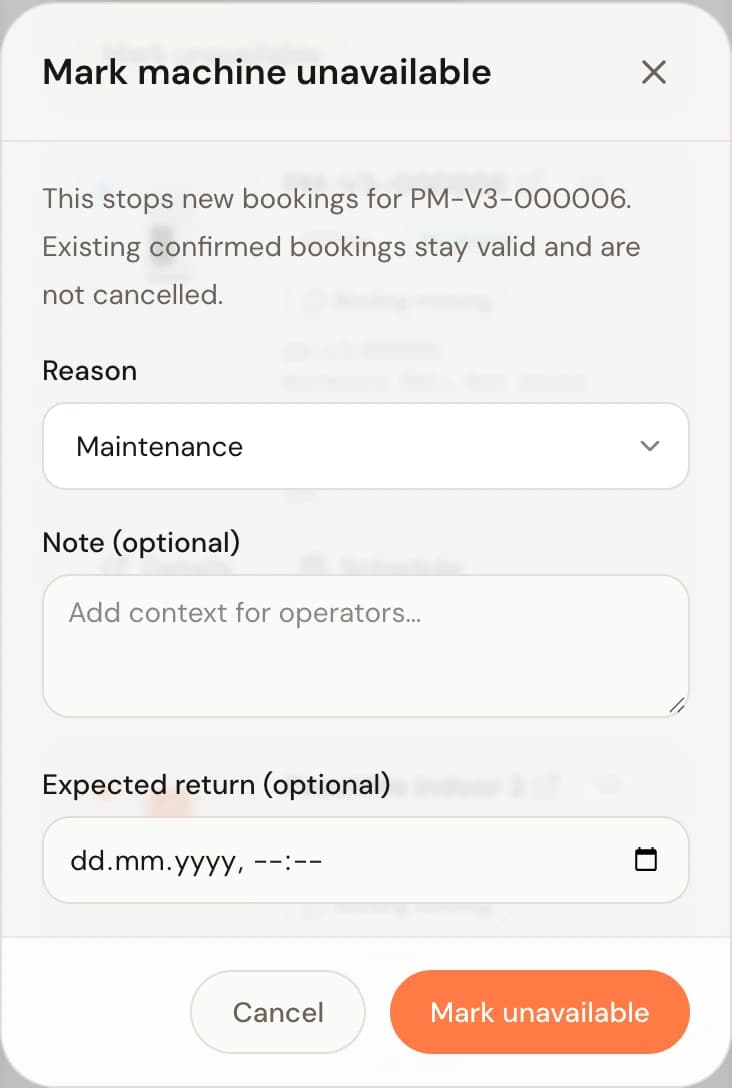
The Mark unavailable dialog: reason, note, and expected return date. - 4
Handle affected bookings
Review the conflict list and today's sessions. Contact PeachMe with each affected booking reference so an alternative or operator-side cancellation and compensation can be arranged. Venue managers should not promise or issue refunds themselves.
- 5
Report the problem
Email PeachMe support with the venue, machine ID, observed behavior, time, booking reference when relevant, and a focused photo or short video. Never include another player's personal data.
- 6
Restore only after verification
When the machine is safe, complete, and tested, open its record and select Restore. Confirm that it is bookable again and that no temporary schedule block still applies.
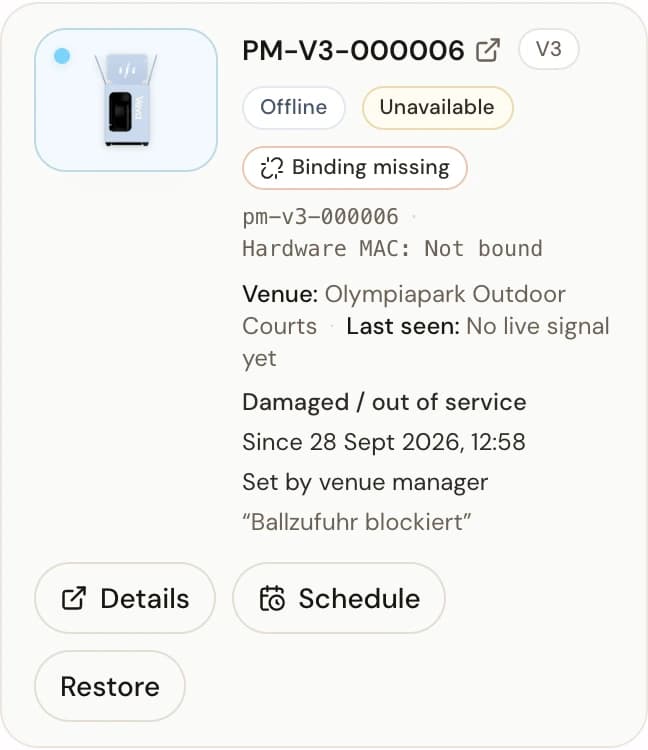
An out-of-service machine shows the Unavailable state and offers Restore once it is safe again.
Stop
End unsafe use
Protect
Mark unavailable
Escalate
Send evidence to PeachMe
Restore
Test before reopening
You're done when
The machine is unavailable to new bookings, affected confirmed sessions have an explicit follow-up, and PeachMe has the evidence needed to investigate. After repair, Restore makes it bookable again.
If something doesn't match
- The portal shows Offline but no manual override: telemetry health and booking availability are separate. Mark the machine unavailable when players should not receive it.
- Existing bookings appear after saving: this is expected. They stay valid until PeachMe or the player follows the normal cancellation path.
- The problem occurred during an active session: complete the safe return flow when possible and include the booking reference. Do not repeat a return or payment action to force an update.
- The machine cannot be restored confidently: leave it unavailable and update PeachMe rather than reopening bookings early.